Communications
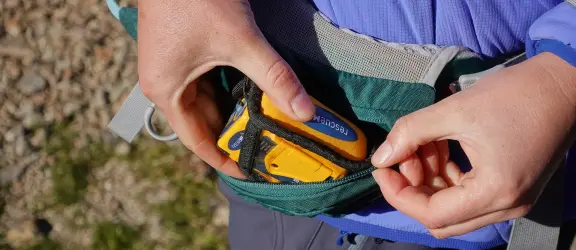
Having a reliable communication device can be a lifesaver in an emergency, enabling you to get help when you need it.
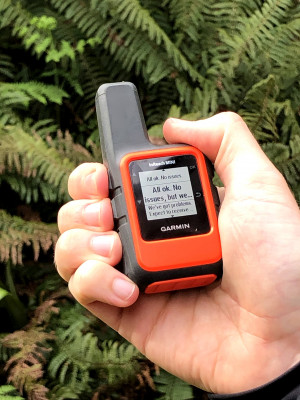
A range of suitable communication devices are available in Aotearoa New Zealand, and below we explore some options in more detail, including satellite messenger devices(like a Garminin Reach or SPOT) and personal locator beacons(PLB). You should, however, do your own research ahead of your outdoor trip to find out what device will work best for your circumstances.
Access to mobile coverage is continually improving across Aotearoa, including with the introduction ofSpace X Satellite services via One NZ and Spark. However, even if your mobile phone is compatible with these services, we recommend always taking another communication device, especially on trips in to remote areas.
Why Take a Communication Device?
Having a reliable communication device that you know how to use is essential, so if things go wrong, you can contact someone or raise the alarm and get help.
You might need to get outside help for a wide range of reasons such as:
- Getting lost or injured
- Changing your route or trip plans
- Running late or needing to stay an extra night out
- Returning earlier than planned
- Checking weather updates
Remember – if you have a device, learn how to use it before you head out.
Choosing the Right Communication Device
Knowing the strengths and weaknesses of your communication device is important. There are a few things to consider including:
- How easy it is to use
- Functionality
- Coverage area
- Type of message or signal it sends and receives
- How often you need to replace the battery or charge it
- How robust it is–can it handle potentially rough situations?
- Costs vs benefits.
Explore the various options below. For more advice, head into your local outdoor store to see what they offer and discuss your needs.
Explore the various options below:
Tips for taking your mobile phone in the outdoors
To get the best out of your phone when outdoors, follow these simple guidelines.
- Protect your phone: Accidents happen, and an unexpected phone mishap isn’t out of the question. It’s easy to drop your phone – in a stream or river – or have a water bottle/bladder mishap in your pack. Keep your phone protected, for example with a waterproof case or zip-lock bag.
- Go light on battery use: To conserve your battery for when you need it most, switch your phone to battery saving mode or flight mode.Remember to turn off flight mode if you wish to use a satellite service.See more on this below.
- Charge as you go: Battery life is the biggest concern when using a phone away from civilization (and power outlets!). Invest in a lightweight power bank or solar charging unit so you can keep your phone charged and ready to use.
- Take a backup: If you’re tramping with others, ensure someone else in the group has a back-up phone. If you’re using your phone for navigation, it also pays to have a printed map marked with your route, just in case your technology fails.
Plan My Walk satellite capability
The Plan My Walk app, our free trip planning tool, can now be accessed via satellite by both One NZ and Spark customers who have an eligible phone and supported plan. Find out more about this service on our Plan My Walk webpage.
How satellite service work
The services apply to TXT and satellite-enabled apps only. Phone calls, browsing the internet and data outside of specific satellite-enabled apps are not available.For example, you can use the Plan My Walk app to find track and other information, but you can’t browse our webpages or use our social media channels.
You must have line of sight to the sky for the service to work as your phone needs to connect to orbiting satellites.Obstructions from tree branches, steep sided gullies or human-made features that restrict your view of the sky will impact your connectivity.
Text messages are unlikely to send or be received instantly. In many cases TXT messages will take a couple of minutes or more as messages travel via the satellite network.
For full details on the satellite to mobile services, visit the One NZ or Spark websites.
Mobile Satellite Services
New Zealand’s mobile phone coverage has improved with the launch of Starlink’s direct-to-cell mobile satellites powered by SpaceX.
In partnership with Starlink, both One NZ and Spark offer satellite TXT and data services. These allow One NZ and Spark customers with an eligible mobile phone and supported plan to send and receive text messages, and use satellite enabled apps (with their data)from remote, rural and backcountry locations that are out of traditional cell tower coverage and where they have clear line of sight to the sky.
While this service is an exciting step forward, we do not recommend you rely solely on your mobile phone as an emergency communication device.In the backcountry or even in areas close to or within urban environments, there are some places where you may not have a clear line of sight to the sky, such as in dense bush or at the bottom of a narrow valley or gulley.
Important note:The NZ emergency 111 number cannot accept calls from data enabled apps. That means you cannot use a satellite-enabled app like WhatsApp to call 111. If you are trying to contact emergency services via your mobile on a satellite connection, you will need to ask someone else, such as your emergency contact, to do this for you.
What are they?
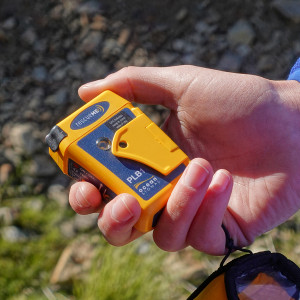
- Personal locator beacons (PLB) are small, emergency distress beacons that emit a UHF radio signal when activated. Search and rescue operations use the signal to locate the beacon.
- If you have a 406 MHz beacon, it must be registered with the Rescue Coordination Centre of New Zealand (RCCNZ).
How do they work?
Once activated, the signal is picked up by satellite and/or aircraft. An alert message is relayed to the nearest Local User Terminal (LUT)ground station, which calculates the beacon’s position and sends the data to the RCCNZ(in Lower Hutt), which in turn starts a rescue operation.
The beacons operate well with a clear view of the sky but may not work as quickly in gorges or dense foliage where the sky is obscured.Do not turn off he device or move once you have activated it. Even if your message does not send immediately, satellites keep moving, and within a few minutes one will come into sight of your location and the message will send.
If it is a false alarm, you will need to get a message to RCCNZ (0508-4RCCNZ or 0508-472-269, or if outside New Zealand,+64 4 577 8030) or the Police as soon as possible. Failure to do this may divert SAR resources from genuine emergencies.
Where can you hire one?
You can either purchase or hire a PLB. Many outdoor stores sell PLBs. We have also collated a list of PLB hire outlets. This is updated regularly.
Running a backcountry event?
Before leaving
- Know how and when to activate the beacon.
- Check the batteries and carry spares if user-replaceable type.
- Register your beacon
- Check the beacon is operational (some units have a test functions to do this).
- For more information please visit www.beacons.org.nz
How to dispose of an old PLB
Old or obsolete beacons need to be disposed of carefully to ensure they are not set off by accident. Do not just throw them away, as a lot of time and money has been spent on search operations to dig beacons out of rubbish tips.
The battery needs to be disconnected and the beacon disposed of according to local regulations, as many beacons contain hazardous materials.
If you sell or dispose of a registered 406 MHz distress beacon, please let Rescue Coordination Centre New Zealand (RCCNZ) know by phoning 0800 406 111.
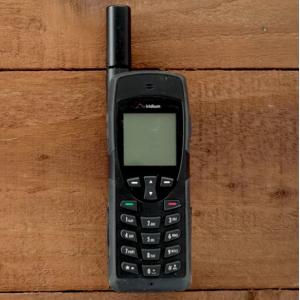
Satellite phones use orbiting satellites (as opposed to traditional cell tower coverage) to connect to phone networks. A satellite phone can be used anywhere in the world to connect to domestic and international numbers, provided you have satellite coverage. Coverage will vary depending on your location. For example, being on top of a mountain with a clear view of the sky will give you better coverage and call quality when compared to calling from the bottom of a valley.
Satellite phones are similar to mobile phones but use orbiting satellites (as opposed to mobile phone coverage towers) to connect to phone networks. A satellite phone can be used anywhere in the world to connect to domestic and international numbers, provided you have satellite coverage. Coverage will vary depending on your location. For example, being on top of a mountain with a clear view of the sky will give you better coverage and call quality when compared to calling from the bottom of a valley.
(Hover or click on the icons below for more information)
* with eligible One NZ or Spark devices or plans.
** with Apple iPhone 14 or later.
Last edited: October 2026